


 David Nicholson
The 2026 BMW iX3 and runs on all new technology and a new BMW interface. Whether you have experience driving electric cars or are coming to EV for the first time this page should build into a useful set of hints and tips.
If you don’t drive an iX3 then check out the review article on the BMW iX3 here or our opinions on and links to the best main dealer offers for new and pre registered EV’s check out our A-Z here
Getting the best efficiency

Some owners will drive just like in their combustion car but EV’s can get a lot more more efficient as drivers gain experience. This is especially true if you EV can hoover up a lot of free energy from regenerative braking like the iX3.

- Drive a bit slower on motorway trips to add a lot of range, reduce charge stops and cut your running costs. Even keeping to the speed limit rather than 80mph helps.
The Arena EV website has got their own estimated range as different speeds and temperatures. At 15c
40mph gets you.. drumroll.. 556 miles or 5.1 miles per kWh
50mph gets you around 472 miles or 4.3 miles per kWh
60mph gets you 396 miles or 3.6 miles per kWh
70mph gets you 340 miles or 3.1 miles per kWh
80mph gets you 295 miles or 2.7 miles per kWh
As you can see range varies..from 556 miles down to under 300. What you can’t change after you order is whether the spec you chose is less efficient. - In hot weather set AC to 21-22c and in cold weather aim for 19-20C. If you’re still comfortable then you’ll gain a little efficiency by not making your AC work as hard. If the outside temperature if fine without heating or cooling then don’t use the AC.
- Use regenerative braking and brake early and smoothly if you can – it takes a lot of energy to accelerate a 2,360kg iX3 forward or up a hill but regen allows you to recover much of that energy when you come to a stop at the lights or drive down a hill or mountain. In the iX3 you can either choose your level of regen braking in the menu or just select drive a second time when you start a journey to choose B mode. B mode provides strong regen and also can bring the car to a complete halt if you bring your foot off the accelerator. If you prefer to coast and use the brake pedal you can but if your braking is very last minute more energy will be wasted.
- Driving modes – A quick glance at mine showed that when 200 miles range was showing in comfort mode, switching to sport mode was still 200 miles. By contrast efficiency mode increased range to 214 miles while the more extreme “max range” mode increases range to 258 miles but blunts acceleration, limits top speed to 60mph and turns off your aircon! Still if you’re stuck in traffic on a mild day it’s potentially free extra range and a 23% saving in your cost per mile while engaged. I use efficiency as a default with max range when sensible to do so but ideally not when overtaking as extra time there is less safe.
- I tend to keep tyre pressures at the higher end of what is recommended to reduce rolling resistance. The car handily monitors tyre pressure and reminds you of the recommended pressure on the same screen.
Speed and journey time
- Remember that speed costs you range and money in any car but the faster you travel the less difference a bit more speed makes to your journey time. For example 100 miles at an average of 70 mph will take you 1 hour and 25 mins.
- Going at 80 mph will shave just 11 mins off that time
- Going at 60mph would add 14 mins but 50 mph would add 34 mins
- Going at that super efficient 40 mph adds over an hour while 30mph adds nearly 2 hours!
Somewhere between 65 and 70mph might turn out to be the efficiency sweet spot but if you’re in a hurry then there is good news under “charging”
The Box Hill Zig Zag regenerative braking test
I ran a little test to see how effective the BMW iX3 is at using energy from braking to make boost your efficiency and range.

- The route started by the car park at the top of Box Hill in Surrey. The car drove down zig zag road to the base of Box hill. Zig Zag road is a slow road popular with cyclists, a 30mph limit and regular speed humps to slow for. We don’t have mountains in southern England so the descent to the A24 was from roughly 600 feet (183 metres) to the A24 road at 160 feet (49 metres).
- The A24 has a 50mph limit, first along the flat valley then after the roundabout up hill on the A24 Leatherhead bypass before turning back to return on the same route finishing with the climb up Zig Zag road.
- Final distance was 10.4 miles and used 2.7 kWh. This meant the consumption on the trip shown by the car was 4.0 miles per kWh or roughly the same as driving the same distance on a flat road at similar speed.
- The car’s regen brakes recovered 2.0 kWh on the trip so without regen you would have to add that to the total consumption which would have been 4.7 kWh used and 2.21 miles per kWh consumption. Thanks to regen 42% of the energy used was recovered back to the battery to use again
- I ran a separate test only up and down Zig Zag road and 63% of the energy you spend getting 2.4 tons up the hill is recovered when you come back down the same height as you started at. Specifically iX3 used a net 0.7kWh after recovering 1.2 kWh of regen from braking over a 3.5 mile journey. This was a slow trip averaging 17.1mph with a remarkable 4.9 miles per kWh energy usage.
UK Running cost examples
| Date | kWh added | miles per 4kW | Cost / miles | Cost per mile |
|---|---|---|---|---|
| 18th May 2026 | 91.81 | 4 | £45.66 / 367 miles | 12.4p |
| Efficiency based on mix of A and B roads and motorway in 15C temps. Charging cost mix of local 22kW Believ at 56p and off peak chargy at 39p =49.73p average per kWh |
||||
| 13th June 2026 | 262.3 | 3.5 | £143.81/ 915 miles | 15.7 |
| As detailed in the 915 mile iX3 UK road trip report. Mainly motorway in varied UK weather conditions. Av price 54p/kWh |
||||
Charging
Like all EV’s, the iX3 will suggest charge stops if you can’t make it to your destination with the energy you have in your battery. Your iX3 can charge from 10-80% in 21 minutes on a 400kW charger. If you can’t find one of them a 350kW charger will only add about a minute. Using a Tesla Supercharger is likely to take 35 minutes for a 10-75% charge.
Not a glitch but worth knowing…the iX3 lets you set a minimum battery level (eg 15%) for arriving at a charger or destination. That is a good thing but if you choose to ignore a charging suggestion without charging the car will keep adding a charge stop back in if you delete one. So if you do want to press on then lower the required % charge level or ignore directions to a charger.

This screenshot from the pay version of the WattsUp app (£14.99 a year on IOS) shows how many locations in UK have at a minimum of 4 chargers that offer charging speeds of 300kW or more. As you will see there is plenty of choice but prices vary widely.
If you let the car make all the decisions on where you charge it may suggest stops at very slow or very expensive chargers or sometimes both. You can help the software by giving it a list of preferred charge point operators.
Open the My BMW app which should be set up as digital key.
- On the front page should be a box with “charging” as the title. Click on the “>” next to the title. Scroll to “services”, and select charging wallet. Check that “BMW charging” is in a blue box with the word active beneath it. This allows you to get big discounts when charging. If it is not set up, check the handbook, the online video guides or the dealer
- Once BMW charging is set up you should be able to pay for some chargers using the My BMW app. You can also enable “plug and charge”. On some chargers, Ionity in particular, this means the charger should identify you by plugging it into your iX3. If so you shouldn’t need to use an app for payment.
Preferred charging networks in UK
Prices shown are at time of writing in May 2026. 80 kWh price example is adding 73% to your battery for example 10-83%. Preferred networks can be selected in the My BMW app but not in the iX3 screens in the car.
- Ionity – Usually costs around 85p per kWh but using the 12 month free subscription with “BMW charging” you pay just 45p. This takes the cost of a 10-83% charge of around 80kWh down from around £68 toaround £34.
Not only is this good value the chargers are fast, mostly 350-400kW. Only problem is some can get congested because in busy places where Tesla would install 20 chargers, Ionity install about 6. There’s no point in waiting 30 mins for a 350 or 400kW charger. - Smart Charge at Sainsbury’s – This has become a big network almost overnight and again that BMW charging gets you a discount to 59p per kWh. That 80kWh charge would therefore cost around £47 and some of there chargers offer a decent 300kW speed.
- BP – normally ridiculously expensive the “BMW charging” app should discount charging to 66p per kWh or £53 for 80 kWh
- EVYVE – No BMW discounts and mostly not fast but if you use the EVYVE app then their current off peak all weekend deal (5pm friday to midnight sunday+bank holidays) is a very reasonable 48p or around £38 for 80kWh
- Applegreen Electric – Speeds vary from 180kW to 400kW but they usually installing hubs with lots of chargers at Motorway service areas. The standard 83p per kWh is not that great but you do at least get a discount to 78p if you use their app. That’s around £64 for that 80kWh charge at time of writing.
- Tesla Superchargers – These would have been higher up the list but for iX3 but a few issues hold it back. Prices for non Tesla owners vary by location but have just gone up to around 60p-65p per kWh in the day and 30p+ off peak. It’s still competitive but speed is limited to 200kW for the iX3 so about 35 mins for a 10-80%. On top of that only 40% of tesla Supercharger locations in UK are open to other EV’s. Still worth having the app and using off peak if the opportunity arises 80kWh comes in at £49.60. Tesla chargers are also a handy backstop in Europe.
- FastNed – Available via BMW charging or the Fastned app for 71p. They have a good reputation for reliability and are plug and charge compatible. That’s around £57 for 80kWh
- Be.EV– using the BMW charging plan takes the cost down to a reasonable 53p which is £42 for 80kWh. Be.EV were more concentrated in the northern half of UK but have grown with the acquisition of MER which is big in the SW of England. Not the fastest but some 300kW locations and a good network. Hopefully they will improve MER quickly. Be.EV App worth downloading for access to further offers including Off-Peak (7pm–7am) at just 39p/kWh which is just £31 for an 80kWh charge . Subscription options are good inc 39p for £9.99 a month but not worth it while BMW already gets a good discount.
- E.ON – This network is pretty small and scattered randomly across the country. 69p/kWh for their fast 300kW chargers is useful while their slowest units isn’t. Doesn’t accept Revolut for payment when I last checked.
- MFG EV Power – Speeds mostly between 150-400kW at 79p this is a big network. Not used them in a long time but pricing online is opaque. You need to go into their app and choose an individual charger before a price is displayed. £63 for 80kWh
- Zest charging – not quick and prices vary but seem to be mostly between 55-72p so £45-58 for an 80kWh charge. Seems to be better value further from London.
- Instavolt off peak only – Instavolt are consistently one of the most expensive charging networks in the UK by day. By night however things have finally become more sensible but only if you charge using the Instavolt app. Current deal at 8pm to 7am at 55p per kWh. They mostly aren’t the fastest but it could still be useful at £44 for 80kWh off peak. Peak is… £73.60 priced at 92p per kWh. Wow.
Preferred charging operator glitch
Not sure if this is a general issue or whether there is a fix but having chosen some preferred charging operators in the app and gone to the charging menu in the car to enable “preferred charging operators only”…. The IX3 then completely ignores those choices and serves up a usual list of any old slow or pricy charging option during navigation.
It seems like the slider Control in the main charging menu does nothing at all for choosing preferred providers.
There is one work around. If you search for a charger in navigation, there is a filter menu at the top right. If you go into that another “preferred charging operators only option” is there if you scroll down. It will then do a search for your preferred operators that one time. Immediately after it will forget the selection and revert to doing any rubbish operator options it fancies.
It does seem a bit pointless selecting your preferred charging network if the software completely ignores you. Has anyone found a solution to this or is there a member of the BMW team looking at bug fixes? I will update if I hear more.
Charging issue for iX3 owners
Some German iX3 owners have reported that when they charge on chargers offering 400kW or more the car may end the charge after only a few mins before charging is halted. If this does happen to you check the settings in the charging menu.
Bjorn Nyland, who is a very experienced tester of EV range and charging has identified one further issue. Essentially if the battery still throttles early by reaching 60c, then when possible ensure heating and cooling in the passenger cabin are switched off when using chargers of 350kW or more. This maximises the cooling cooling for the battery.
Range and efficiency
One option should be titled something like battery protection mode which you can use to slow down your charge speed. Make sure this mode is not enabled
Another allows you to choose the fan speed to cool the battery when charging. This is sometimes set by default to medium to reduce noise in residential neighbourhoods. Unless the fan noise will cause a nuisance the setting should always be high. If you don’t the battery temperature will rise and charge speed will stop or slow when charging at maximum speed
Panoramic Vision Display Modes
Via the main display you have limited options to change the Panoramic vision display when you switch between drive modes
Personal
This display is excellent in practice. but you may find the Personal Mode a little underwhelming as I did. After all, the choice of widgets to add are frankly more banal than wow. 3 ways to display date or time? tick. Compass and air quality index? tick? Outdoor temperature and weather? tick. Media often shows album cover but not artist or song title. Phone signal strength is good to know and knowing your altitude is cool in a geeky kind of way but for such a brilliant piece of screen tech it feels like BMW ran out of ideas for what to display. Well the good news is the preset displays are much better even if BMW don’t let you take your pick of widgets from these.
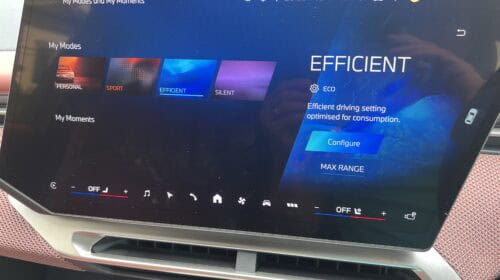
Sport – the Dynamics display
This brings in sporty elements like motor speed, a big power meter for acceleration and regen as well as measurement of g forces from acceleration, deceleration and cornering. It has 2 versions.
Efficient – Brings up the Trip display
This adds more efficiency info including miles per kWh that can be adjusted in the main efficiency display between things like stats that trip or day or since charge or since you reset trip. It also has 2 versions.
Silent
This is essentially a way to shut down most of the display so just things like speedometer remain visible.


- Using the steering wheel buttons gives you more options to control the display. If you press the button with 3 lines on the top left then this menu appears in the centre of the panoramic display. Use the left and right arrows to choose between options then the blank centre button to select one.
- When you’re in a mode with 2 versions (2 dots like a large : indicate this) you can switch between the 2 versions of sport or efficiency modes using the up down and select arrows or simply sliding your finger up and down the selection button then press down to select.
- Personal is the same as you get via the drive mode selector above.
- BMW Maps – from left to right – destination with arrival time and expected charge on arrival along with turn directions on a map in the centre. One super clever bonus feature is even if you don’t choose the map the pano vision display will still pop a junction map or lane selections when you are approaching a junction. Smart
- TRIP 1 – left to right – regenerative braking energy in kWh, live energy consumption, chosen* trip energy consumption, chosen trip miles, total miles on the car
- TRIP 2 – Left to right – if you have a destination set then it will show distance to destination and expected battery % on arrival then a picture of the car with a bar that displays your destination on a flag with a bar above it linking to your expected range. The rest of the bar shows the maximum range you could get, again relative to your destination.
- DYNAMICS 1- Probably the least useful display showing rotation speed of the motor, Drive temperature, Power and Torque
- DYNAMICS 2 – G force display for corners and acceleration and braking, Display bar showing power used or being recovered by regen labelled as “charge”
Journey data on main screen
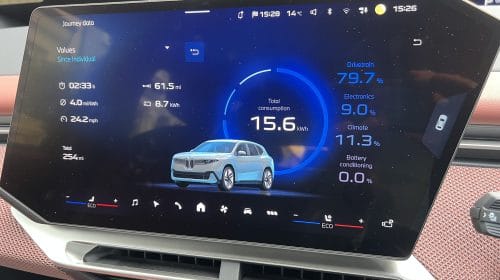
There is a shortcut to this on the right of the display with the image of the car from the above. This is where you can select the chosen trip info you want to display. The choices are since individual, since charging, today, since factory and my trip which I think is your current drive. These selections also decide what trip data is is on the panoramic vision display.
Silly annoyance – when you use the short cut button the car shows you a rather useless intermediate screen that tells you almost nothing. You then have to press this to get the screen you want. Why doesn’t the shortcut just go the screen you want.
Voice assistant
Glitch on some new cars
My iX3 was suffering from a glitch. To discover if yours has the same glitch. Signs you have the issue are..
- The words “hey BMW” gets no response
- Using the “microphone” symbol on the right of the steering wheel does respond but then there is a third sign
- Saying “Navigate to (a place in your country)” get the response “sorry I can’t get your exact location right now, when its safe to do so check the location setting for your vehicle”
- example of this on video here
The Fix
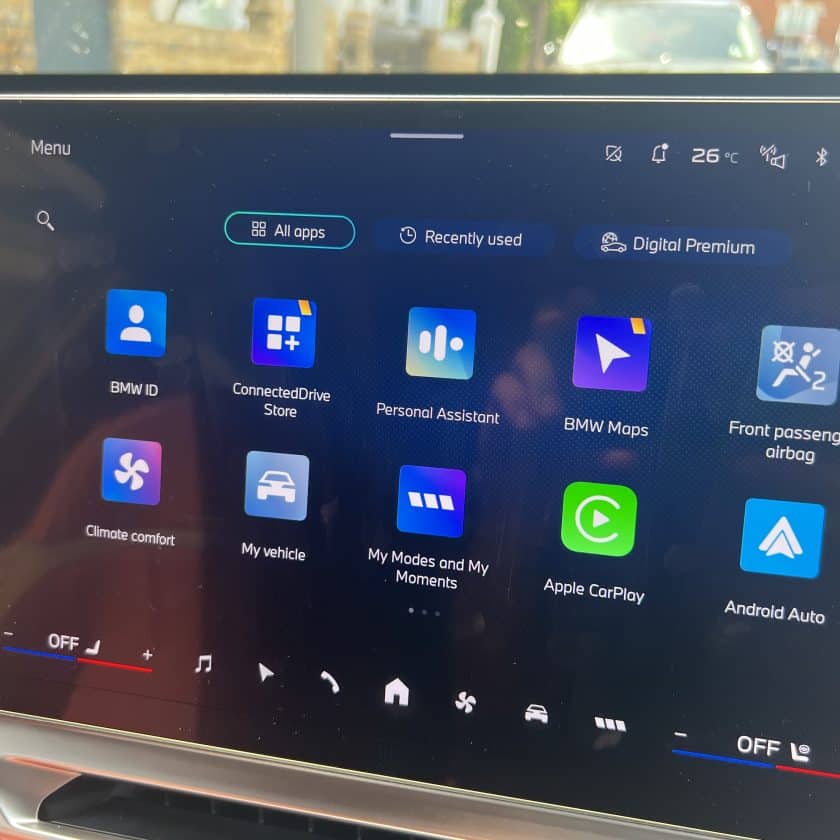
Go the apps Connected Drive store from the app screen
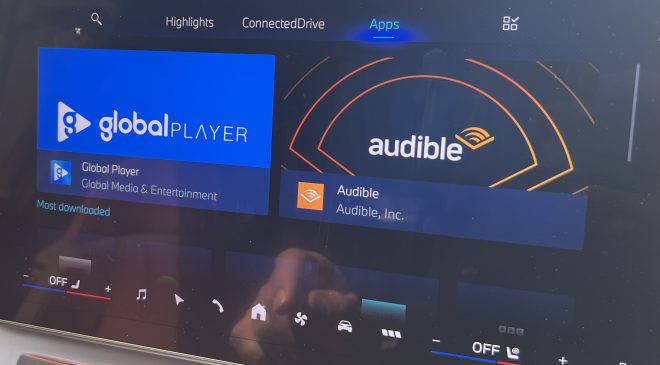
On the top menu you should see 4 menu choices from the left.. Highlights, ConnectedDrive, Apps then an app symbol with 3 boxes and a tick. Choose that last one.
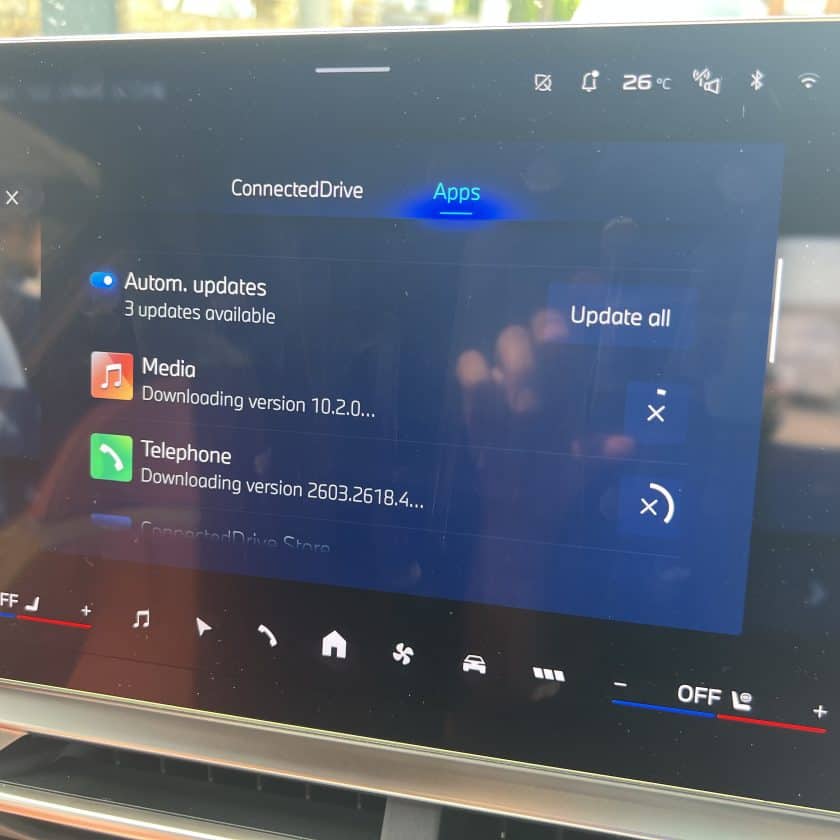
Check if any apps need updating, especially voice assistant. Update this app or all apps. You probably need to be connected via a BMW subscription or your phone or home wifi
If your voice assistant app needed an update then installing the update should make it operational. Bear in mind that some additional functions depend on having an Amazon Alexa account with the privacy issues that entails. As far as I am aware so far there is no overall system reboot option so in some cases updating an app may be your best chance to sort an issue. Dealers can help too but Operating system X will be new to them too at first.
Other initial glitches
- Initial setup for some things like plug and charge on delivery take around 24 hours if you are also setting up the BMW charging account at the same time. The car may give you messages like plug and charge contract cancelled. Give it a day or 2 as there is a process for verifying new accounts that takes a little time.
- If there is a method to opening the rear hatch using a foot wave I’ll let you know when I master it. Currently it works about 1 in 10 times for me.



[…] This page will be regularly updated and extended. We’re also adding some hints and tips for Neue Klasse owners here. […]